Shotik
Windowsstable
Purpose
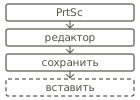
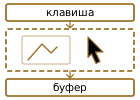
Press a key, select an area, add an arrow, a caption or a blur — the shot is already in the clipboard. No editor to open, no file to save.
Before / after
How to use
Install it and press the screenshot key. Select an area, add marks, release — the picture is in the clipboard, paste it anywhere.
For engineers ▸
C#/.NET 8 · WPF · auto-update via Velopack · zero telemetry · ~80 MB of memory.